

An advanced method of analyzing the results of your calculations is to use a Data Table. With the Data Table, Excel can do your calculation again by changing two input values.
Author: Henrik Schiffner
Henrik Schiffner is a freelance business consultant and software developer. He lives and works in Hamburg, Germany. Besides being an Excel enthusiast he loves photography and sports.
How To Hide And Group Rows And Columns In Excel

You got an Excel table with some unimportant rows, but you don’t want to delete them. In such case, you might want to “hide” them. There are two options of hiding rows (and columns): Either right-click on the row (or column) number and click on “Hide” or use the group function.
Remove Duplicates: How to Condense Excel Tables to Unique Items

Now we are coming to a very useful but rather unknown function: Remove Duplicates. Let’s say, you got a list of names and some names are twice on the list. With Remove Duplicates, you can delete those duplicated names automatically so that each name appears only one time.
How to Select All Blank Cells in Excel
When you work with data, you often want to select certain cells, for example all blank cells. You might want to fill them or just mark them.
Pivot Tables – How to Create a Pivot Table in Excel
You have some data and want to gain a quick overview? Or conduct some easy evaluation? Maybe later on analyze the data in more detail? For all these purposes, a Pivot Table can be a good choice.
How to Use the Format Painter in Excel
Which step do you spend the most time, when you create an Excel model? Typing formulas and checking results, or rather setting the format, e.g. selecting borders, backgrounds, fonts, font sizes, font styles and even row and column heights and width? Formatting an Excel table can take a large amount of time, but “Format Painter” can greatly reduce the time you needed.
How to Use Conditional Formatting With Formulas in Excel
One advanced scenario of Conditional Formatting is to use formulas to determine the format. Let’s say, you want to change the background color of cell A if cell B has a certain value.
How to Send a Workbook as PDF Attachment From Excel
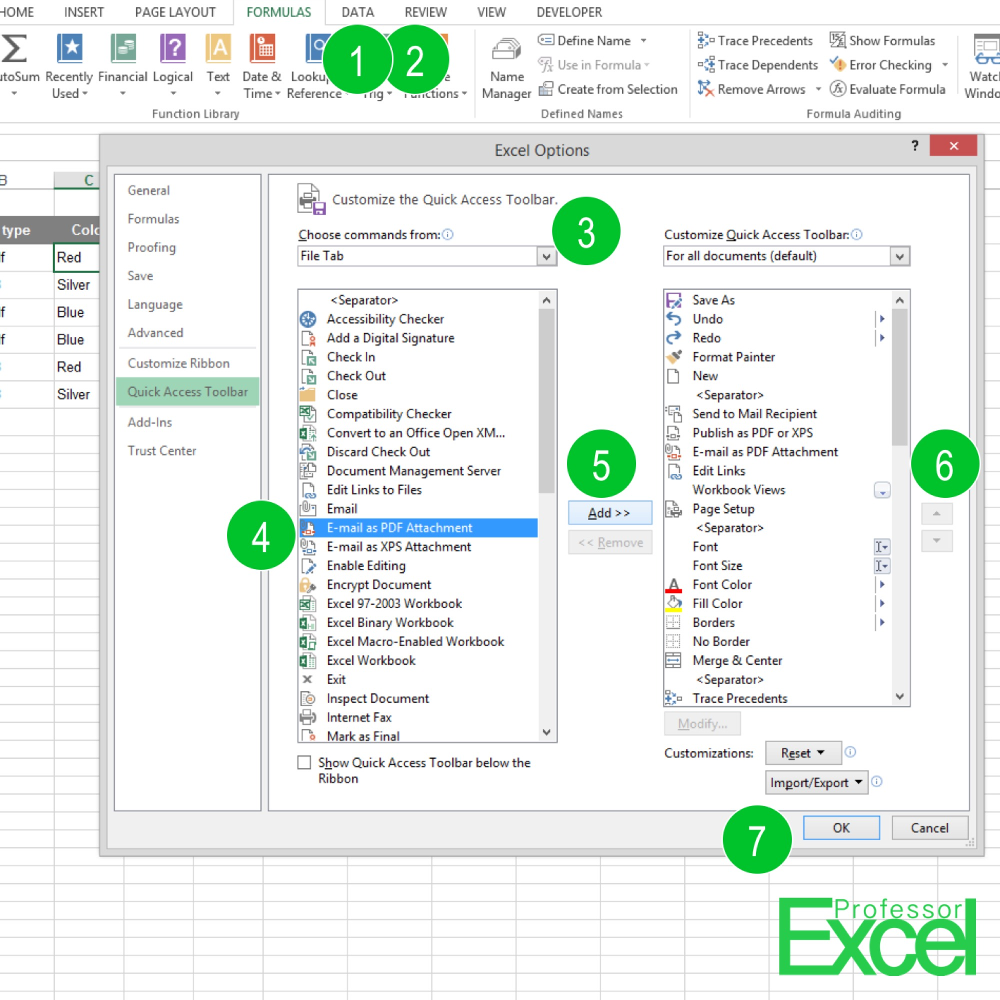
Which method do you use for sending an Excel file as a PDF via E-Mail? Go to Home –> Export –> Create PDF/XPS, then choose the folder and press “Publish”? Or do you go to Outlook, create a new E-Mail, search for the PDF file on your hard drive and attach it? There is a much faster way with just one click!
VBA Macros in Excel: How to Record, Edit and Run Them

With VBA macros, you can do many things which aren’t possible using the build in Excel functions. You can save a lot of time by using macros, especially with repeating tasks.
How to Compare Two Lists in Excel

Let’s assume, we have the following (although realistic) challenge: We got two lists which should have the same items in Excel. But they aren’t exactly the same so that we need to compare them. But how do we find out the best way, which items are missing in either one of the lists? Instead of… Continue reading How to Compare Two Lists in Excel